1 + 12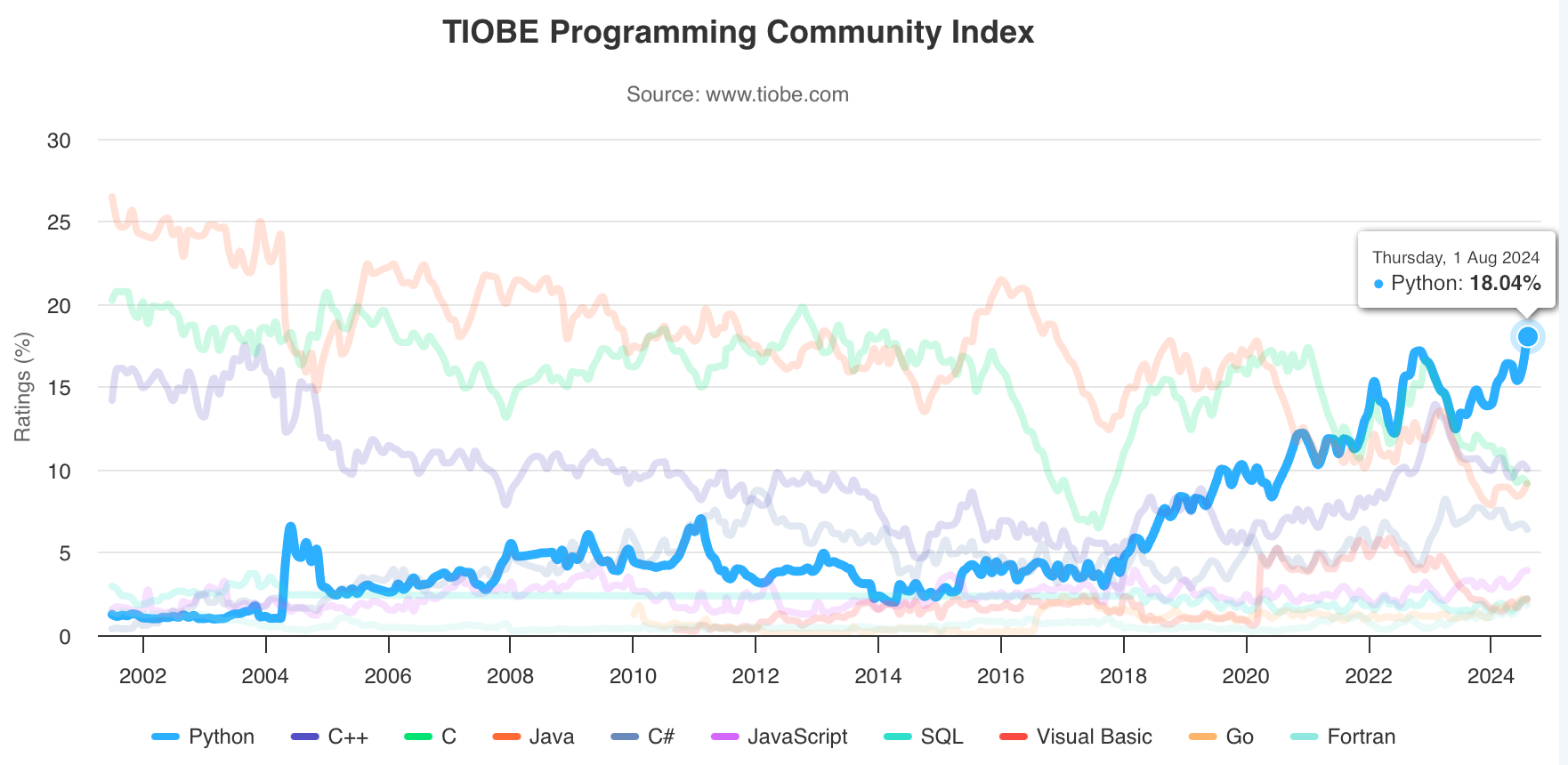
让我们开始第一个Python程序:
1 + 12Shift + Enter (Shift + Return on a Mac)B (below) 或 A (above)D + D (按两次 D)Ctrl + S (Cmd + S on a Mac)#开始的行为注释,不会被执行# 赋值给num1和num2
num1 = 37
num2 = 5
# 计算和
sum = num1 + num2
# 展示结果
print(sum)42A set of instructions to perform a task
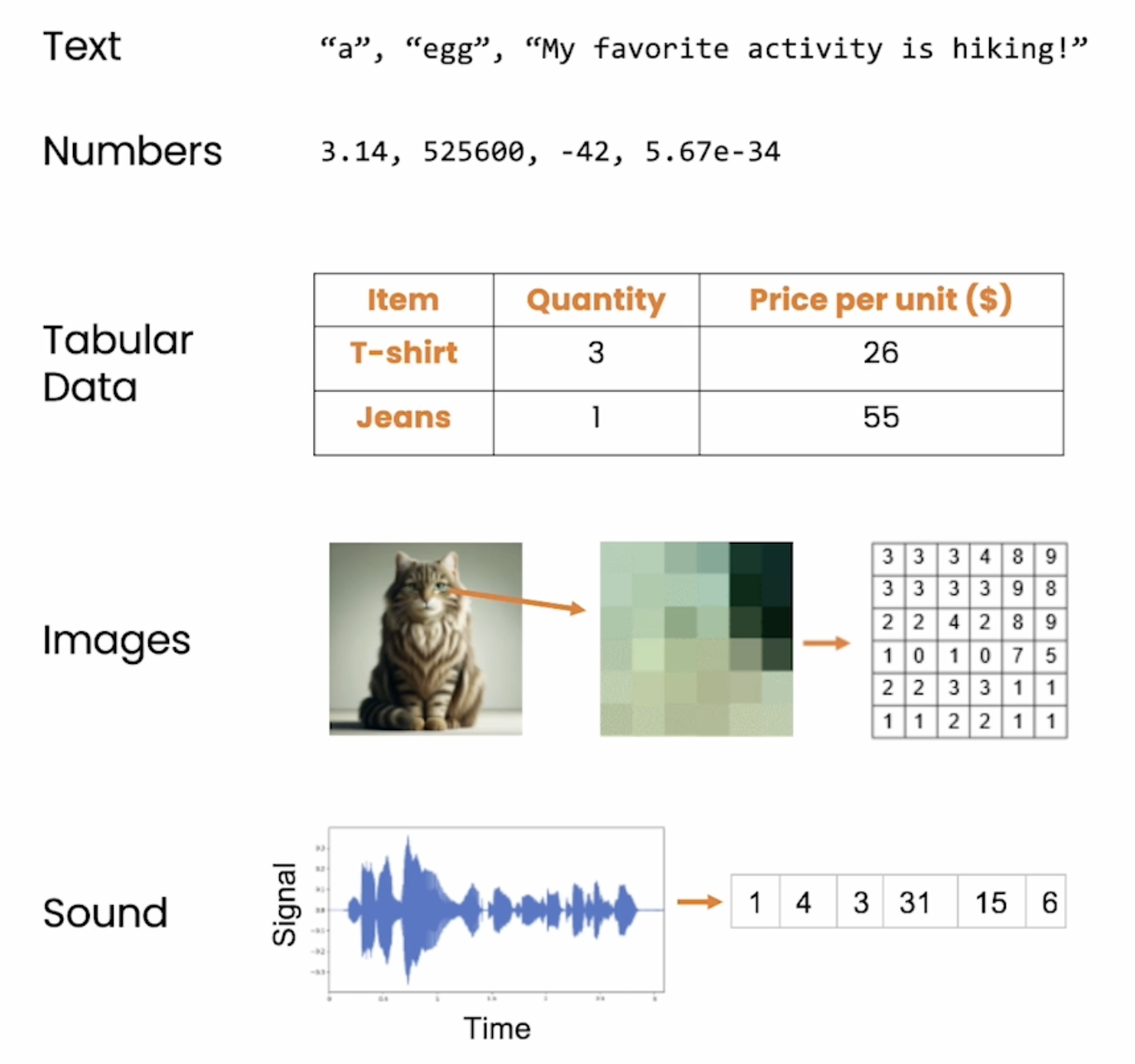
编程本质上就是在处理文字和数字。常见的数据类型比如日期、时间、货币、百分比、电话号码、邮件地址、网址等等。
例如:
"Hello, world""My favorite drink is Earl Grey tea""_(ツ)_!""2.99""大数据Big Data 》。!你好"注意: 引号必须是英文的引号 " " ,而不是中文的引号 “ ” 。
print("Hello World!")Hello World!type("Hello World!")strprint("""这是一个多行字符串的实例
也可以使用换行符。""")这是一个多行字符串的实例
也可以使用换行符。\n换行符,例如 print("Hello\nWorld")
\r\n(回车加换行)作为新行的标记。\t 制表符; \" 双引号; \' 单引号函数的概念会在后面继续讲。我们可以用 """ 来创建多行字符串。
如果写成 print("Hello"World") 会出现错误:SyntaxError: EOL while scanning string literal。

语法:string[start:stop:step]
a = "Python is easy"
len(a)14print(a[1]) # yyprint(a[1:4]) # ythythprint(a[1:4:2]) # ytyh"Hello" in "Hello World!"True"hello" not in "Hello World!"True"hello" + " World!"'hello World!'"hello" * 2'hellohello'"hello".upper()'HELLO'Python 中的数字类型有三种:整数(int)、浮点数(float) 和 复数。
3, 400, -2, 03.0, 3.14, -2.5print (10 % 3) # Modulus
print (2 ** 3) # Exponentiation
print (10 // 3) # Floor division1
8
3print(3 + 2 * (1 - 1) + 2 ** 2 )7print(type(3)) # Int
print(type(3.0)) # Float<class 'int'>
<class 'float'>print(float(3)) # Int to Float
print(int(3.0)) # Float to Int3.0
3n = 3
print(type(n))<class 'int'>n_str = str(n)
print(type(n_str))<class 'str'>s = "3.5"
print(type(s))<class 'str'>s_float = float(s)
print(type(s_float))<class 'float'>x = 5y = "Hello, World!"_ 表示空格my_variable_namemyVariableNamebalance, current-balance, current balance, true, currentBalance,
current_balance, _spam, SPAM, 4account, account4, 100, total_$um, 'guanli'Python的变量是动态类型的,这意味着变量的数据类型是根据赋给它的值来确定的。
Python关键字: False await else import pass None break except in raise True class finally is return and continue for lambda try as def from nonlocal while assert del global not with async elif if or yield
num = 5
num = 32print(num)32num = num + 1
print(num)33num = "Hello"
print(num)Helloname = "小李"
print("你好," + name + "!")你好,小李!year = 1998
print("小李出生于" + year + "年!")year = 1998
print("小李出生于" + str(year) + "年!")小李出生于1998年!year = 1998
name = "小李"
print(f"我是{name},出生于{year}年!")我是小李,出生于1998年!print(f"Isabel is {28/7} years old.")Isabel is 4.0 years old.问题: python format string 里面如何小数取整?
print(f"Isabel is {28/7:.0f} years old.")Isabel is 4 years old.f"|{name:<10}|{name:^10}|{name:>10}|"f"{number:04}"f"{percentage:.2%}"return)结果。
len("Hello World!")round(3.14159)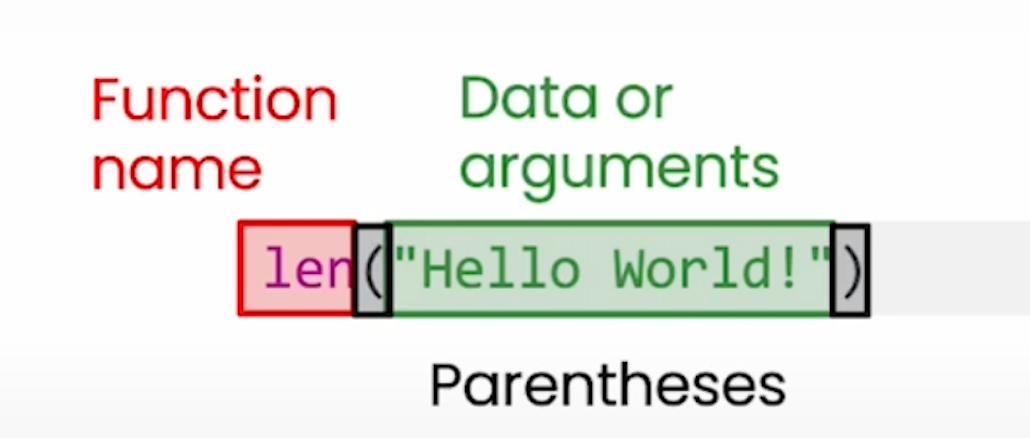

print("Hello")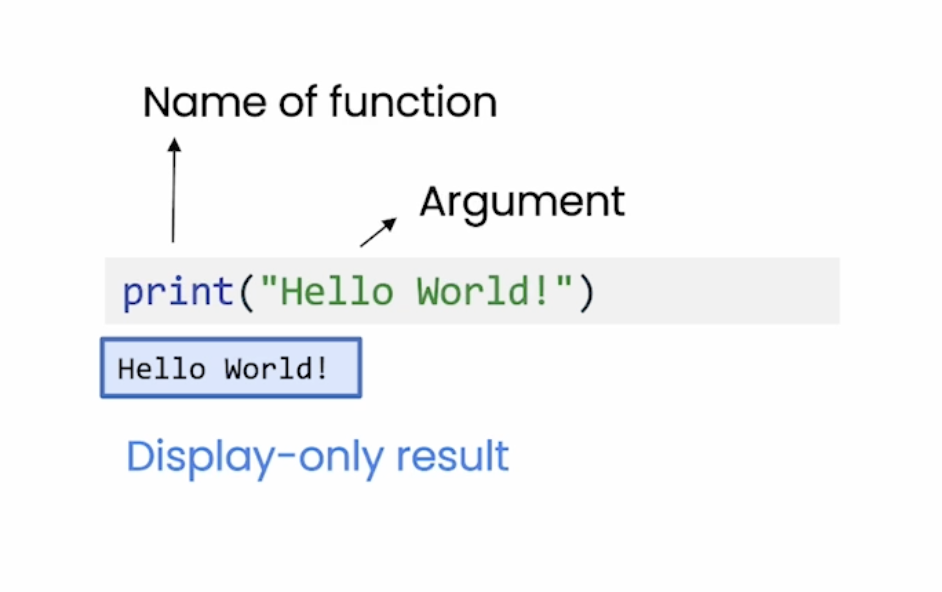
def add(x, y):
  z = x + y * 2
return zdef greet():
print('Hello World!')def greet(name):
print(f'你好,{name}!')
greet('小李')你好,小李!lambda x: (x + 1) ** 2type(greet) 可以查看函数类型lambda x: (x + 1) ** 2<function __main__.<lambda>(x)>f = lambda x: (x + 1) ** 2type(f)function| 类型 | 例子 |
|---|---|
列表 list |
my_list = [1, 2, 3] |
元组 tuple |
my_tuple = (1, 2, 3) |
集合 set |
my_set = {1,3,5} |
字典 dict |
my_dict = {'David': 25, 'Mark':30} |
string不可以。example_list = [1, 2, 3, 4, 5]
print(example_list)[1, 2, 3, 4, 5]print(example_list[0])1print(example_list[1:3])[2, 3]print(example_list[::2])[1, 3, 5]example_list.append(1)
example_list[1, 2, 3, 4, 5, 1]example_list.insert(0, 111)
example_list[111, 1, 2, 3, 4, 5, 1]example_list[2] = 10
example_list[111, 1, 10, 3, 4, 5, 1]L = [['Apple', 'Google', 'Microsoft'],
['Java', 'Python', 'Ruby', 'PHP'],
['Adam', 'Bart', 'Lisa']]
# 打印出Apple:
# 打印出Python:
# 打印出Lisa:print(L[0][0])
print(L[1][1])
print(L[2][2])Apple
Python
Lisaexample_tuple = (4,5,"test",8)
type(example_tuple)tupleexample_tuple[0]4example_tuple[0] = 10lp = [1,2,3,4,5,5,5,5,5,5,5,5]
set(lp){1, 2, 3, 4, 5}set1 = {"上证综指","深圳成指","恒生指数",
"日经225指数","道琼斯指数"}
type(set1)setset2 = {"标普500指数","道琼斯指数","沪深300指数",
"日经225指数","发过CAC40指数","德国DAX指数"}
type(set2)setset1 | set2 # 并集{'上证综指',
'发过CAC40指数',
'德国DAX指数',
'恒生指数',
'日经225指数',
'标普500指数',
'沪深300指数',
'深圳成指',
'道琼斯指数'}print(set1 & set2)
print(set1.intersection(set2)){'日经225指数', '道琼斯指数'}
{'日经225指数', '道琼斯指数'}print(set1 - set2) # set1对set2的差集
print(set2 - set1) # set2对set1的差集{'深圳成指', '上证综指', '恒生指数'}
{'标普500指数', '沪深300指数', '发过CAC40指数', '德国DAX指数'}set1.add("德国DAX指数")
set1{'上证综指', '德国DAX指数', '恒生指数', '日经225指数', '深圳成指', '道琼斯指数'}set1.discard("日经225指数")
set1{'上证综指', '德国DAX指数', '恒生指数', '深圳成指', '道琼斯指数'}{key1:value1, key2:value2, key3:value2 ,...}
dict1 = {"指数名称":"沪深300",
  "证券代码":"000300",
  "交易日期":"2019-01-08",
  "涨跌幅":-0.0022} # 直接法创建
print(type(dict1))
<class 'dict'>dict2 = {} # 间接法创建
dict2["指数名称"] = "沪深300"
dict2["证券代码"] = "000300"
dict2["交易日期"] = "2019-01-08"
dict2["涨跌幅"] = -0.0022
print(type(dict2))<class 'dict'>dict1.keys()dict_keys(['指数名称', '证券代码', '交易日期', '涨跌幅'])dict1.values()dict_values(['沪深300', '000300', '2019-01-08', -0.0022])dict1.items()dict_items([('指数名称', '沪深300'), ('证券代码', '000300'), ('交易日期', '2019-01-08'), ('涨跌幅', -0.0022)])dict1['交易日期'] = "2019-01-07"
dict1{'指数名称': '沪深300', '证券代码': '000300', '交易日期': '2019-01-07', '涨跌幅': -0.0022}常用的循环对象有:
list、tuple、dict、set、str等range(), enumerate() 函数生成对象names = ['Michael', 'Bob', 'Tracy']
for name in names:
print(f'你好,{name}!')你好,Michael!
你好,Bob!
你好,Tracy!#进行一定目的或逻辑的for循环
result = 0
for i in range(1, 101):
result = result + i
result5050grades = {'Michael': 95,
'Bob': 75,
'Tracy': 85}
for name, grade in grades.items():
print(f'{name}的分数是:{grade}')Michael的分数是:95
Bob的分数是:75
Tracy的分数是:85print(True)
print(False)
# no error ? 没有引号True
FalseTrue 和 False。print(10 == 9)Falseprint(10 < 9)Falsetype(10 < 9)booltype(True)boolx = 10 == 9print(x)FalseComparison Operators: >, <, >=, <=, ==, !=
Membership Operators: in, not in
Equality Operator: and, or, not
"He" in "Hello"True1 in [1, 3, 3, 4]True3 >= 2 and 3 < 2Falseage = 17
if age >= 18:
print('your age is', age)
print('adult')age = 3
if age >= 18:
print('your age is', age)
print('adult')
else:
print('your age is', age)
print('teenager')your age is 3
teenager注意不要少写了冒号:。
age = 20

if 0<= age <= 3:
    print('your age is', age)
    print('baby')
elif 3< age < 18:
    print('your age is', age)
    print('teenager')
else:
    print('your age is', age)
    print('adult')
your age is 20
adult注意: None、[]、''、0与False功效几乎完全等同!
如果condition为None、[]、''、0、False,dosomething是不执行的!
break: 终止当前循环,且跳出整个循环continue: 终止当次循环,跳出该次循环,直接执行下一次循环pass 不执行任何操作,一般用于占位else: 当 for 循环正常执行完毕(即没有通过 break 语句提前结束)时,else 块会被执行r_list = [-0.0137, 0.024, 0.0061, -0.0022,
0.0101, -0.0087, 0.0196, 0.0002, -0.0055 ]
for i in r_list:
if i > 0.02:
break
print("收益率数据:",i)收益率数据: -0.0137for i in r_list:
if i < 0:
continue
print("非负收益率数据:", i)非负收益率数据: 0.024
非负收益率数据: 0.0061
非负收益率数据: 0.0101
非负收益率数据: 0.0196
非负收益率数据: 0.0002for i in r_list:
if i < 0:
pass # 涨跌幅数据为负数时,不执行任何操作
else:
print("非负收益率数据:",i)非负收益率数据: 0.024
非负收益率数据: 0.0061
非负收益率数据: 0.0101
非负收益率数据: 0.0196
非负收益率数据: 0.0002for i in range(5):
if i == 6:
print(f"Found {i}")
break
else:
print("Not found")Not foundn = 1
while n <= 5:
print(n)
n = n + 1
print('END')1
2
3
4
5
ENDn = 0
while True:
n = n + 1
print(n)
if n >= 5:
break1
2
3
4
5os, pathlib, requests等pip安装更多的packages
pip install 库名.whl文件,然后 pip install 库文件.whl%pip install --upgrade pip
%pip config set global.index-url https://mirrors.tuna.tsinghua.edu.cn/pypi/web/simple%pip install dfplyimport os
os.getcwd()'/Users/xinlu/_project/AI4MPAcc-Course'import pandas as pd
pd.DataFrame()from os import getcwd
getcwd()'/Users/xinlu/_project/AI4MPAcc-Course'from os import getcwd as pwd
pwd()'/Users/xinlu/_project/AI4MPAcc-Course'try 和 except 语句a = 10
nums = [3,4,5,2,0,1,7,8]
for b in nums:
print(a, b, a/b)
print("继续")a = 10
nums = [3,4,5,2,0,1,7,8]
for b in nums:
try:
print(a, b, a/b)
except:
pass
print("继续")10 3 3.3333333333333335
10 4 2.5
10 5 2.0
10 2 5.0
10 1 10.0
10 7 1.4285714285714286
10 8 1.25
继续Markdown 是一种轻量级标记语言,用于格式化纯文本。
Jupyter notebook Markdown单元格
各种 Chat Bot 的交互界面
技术文档
使用 # 表示标题,# 的数量表示标题的级别,最多支持六级标题。
# 一级标题
## 二级标题
### 三级标题
#### 四级标题
##### 五级标题
###### 六级标题使用 * 或 _ 包围文字表示斜体,使用 ** 或 __ 包围文字表示粗体,使用 ~~ 包围文字表示删除线。
*斜体* 或 _斜体_

**粗体** 或 __粗体__

~~删除线~~-、+ 或 * 表示。. 表示。- 项目1
- 项目2
- 子项目2.1
- 子项目2.2
1. 项目1
2. 项目2
1. 子项目2.1
2. 子项目2.2使用 [文本](链接) 创建链接,使用 [文本](链接 "标题") 创建带有标题的链接。
[Google](https://www.google.com)

[Google](https://www.google.com "访问Google")使用  插入图片。
使用 > 表示引用,可以嵌套使用。
> 这是一个引用
>> 这是一个嵌套引用` 包围代码。``` 或四个空格缩进代码。
`行内代码`


```python
def hello():
    print("Hello, World!")
```使用三个或以上的 -、* 或 _ 表示分割线。
---

***
___使用 | 创建表格,使用 - 定义表头。
| 头1 | 头2 | 头3 |
| --- | --- | --- |
| 内容1 | 内容2 | 内容3 |
| 内容A | 内容B | 内容C || 头1 | 头2 | 头3 |
|---|---|---|
| 内容1 | 内容2 | 内容3 |
| 内容A | 内容B | 内容C |
使用 $ 包围公式,支持 LaTeX 语法。
inline formula $ f\left(Y_{i t}\right)+R_{i t} g\left(Y_{i t}\right)+R_{i t} D_{i t} c\left(Y_{i t}\right)+D_{i t} d\left(Y_{i t}\right) + \epsilon_{i t} $
inline formula \(f\left(Y_{i t}\right)+R_{i t} g\left(Y_{i t}\right)+R_{i t} D_{i t} c\left(Y_{i t}\right)+D_{i t} d\left(Y_{i t}\right) + \epsilon_{i t}\)
block formula
$$
X_{i t}=\underbrace{f\left(Y_{i t}\right)+R_{i t} g\left(Y_{i t}\right)+R_{i t} D_{i t} c\left(Y_{i t}\right)+D_{i t} d\left(Y_{i t}\right)}_{=m\left(Y_{i t}, R_{i t}\right)}+\epsilon_{i t},
$$
\[ X_{i t}=\underbrace{f\left(Y_{i t}\right)+R_{i t} g\left(Y_{i t}\right)+R_{i t} D_{i t} c\left(Y_{i t}\right)+D_{i t} d\left(Y_{i t}\right)}_{=m\left(Y_{i t}, R_{i t}\right)}+\epsilon_{i t}, \]
from IPython.display import display, Markdown
display(Markdown("### 测试三级标题"))
for x in range(5):
# Print in Markdown format
display(Markdown(f"${x}^2$ <red style='color:red'> = </red> **{x**2}**"))VS Code
Obsidian